
Archiving a Reward allows you to remove it from the platform's default search results without actually deleting the Reward or its associated Redemptions. The archived Reward will not be visible to Members on your website or app, so Members will no longer be able to redeem the Reward.
However, if a Member has redeemed the Reward prior to it being archived, and then you archive the Reward, the Member will still be able to see and use their Redemption.
To archive a Reward:
-
Select Rewards from the top navigation bar, then select Rewards > Rewards from the side navigation menu. The Rewards screen is displayed.
-
Search for the desired Reward (see
-
Next to the desired Reward, from the Status drop-down menu, select Archive. A confirmation dialog box is displayed; click Confirm.
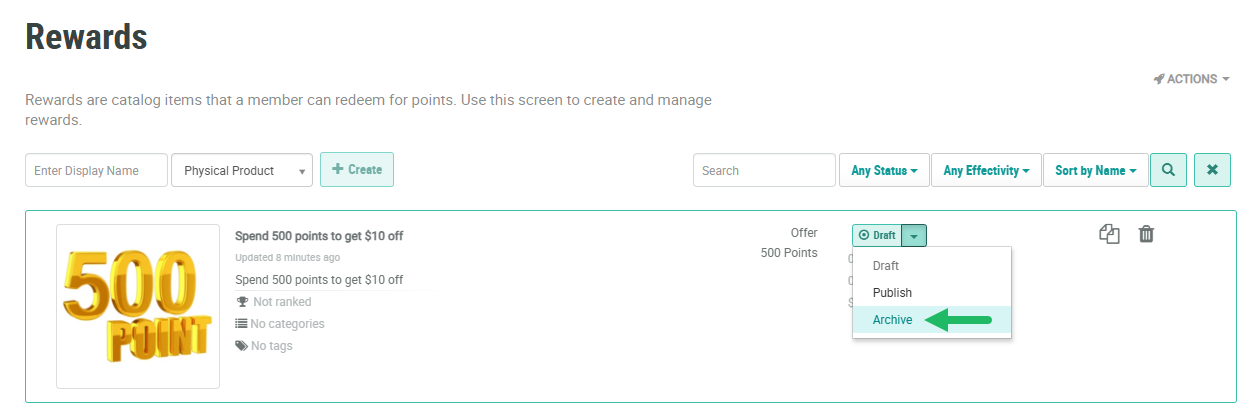
You can also archive a Reward from the Reward Details screen:
-
Select Rewards from the top navigation bar, then select Rewards > Rewards from the side navigation menu. The Rewards screen is displayed.
-
Search for and select the desired Reward (see
-
Within the header area of the screen, from the Status drop-down menu, select Archive. A confirmation dialog box is displayed; click Confirm.